
처리중 입니다
- 최근 검색어 전체삭제
- 최근 검색어가 없습니다.
- 인기 검색어
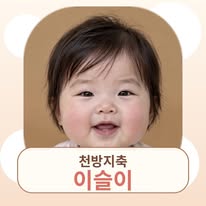

말하는 AI 아기 영상 만들기 📸🎬
사진 프롬프트 · 각도별 사진 만들기 · Google Flow 영상 제작
말하는 AI 아기 영상 만들기 — 사진 제작부터 Google Flow까지이슬이의 “슬라임? 왜 사? 내 볼이 슬라임인데?” 제작 가이드입니다.
아래 영상 프롬프트는 제작 기록을 바탕으로 재구성한 예시입니다. 최종 입력 원문과 완전히 동일한지는 확인되지 않았습니다.
1. 캐릭터 기준 사진 만들기
ChatGPT에서 이미지 생성을 요청하며 아래 프롬프트를 넣으세요. 마음에 드는 얼굴 한 장을 저장하고 다음 사진마다 함께 첨부하세요.
Photorealistic studio portrait of a fictional chubby 6–8 month old Korean baby sitting upright, facing the camera straight on, with a calm expression. Very round full cheeks, small dark brown eyes, a tiny nose, small pink lips, rosy cheeks, and short soft dark brown hair with a slightly messy side-swept fringe. Wearing a plain white short-sleeve cotton bodysuit. Both hands resting in her lap. Soft natural light, plain warm beige background, natural skin texture, sharp focus on the face. Vertical 9:16, medium close-up, eye-level. Avoid cartoon styling, doll-like skin, distorted hands, extra fingers, text and logos.
2. 같은 캐릭터를 여러 각도로 만들기
기준 사진을 첨부하고 각도마다 한 장씩 따로 요청하세요.
[3/4 각도]
Use the attached image as the facial identity reference. Keep the same fictional baby, facial proportions, hairstyle, skin tone, white bodysuit and lighting. Change only the camera angle to a three-quarter view. Keep both eyes visible and the face clearly recognizable. Natural skin texture, warm beige background.
[옆모습]
Use the attached image as the facial identity reference. Keep the same fictional baby, facial proportions, hairstyle, skin tone, white bodysuit and lighting. Change only the angle to a side profile. Preserve the same forehead, nose, lips and round cheeks. Natural skin texture, warm beige background.
눈·코·입·볼·앞머리를 비교해 다른 아기처럼 보이는 사진은 참조에서 제외하세요.
3. 영상 첫 장면 사진 만들기
기준 사진을 첨부하고 아래 프롬프트로 배경·옷·자세를 바꿉니다.
Use the attached reference images to preserve the facial identity of the same fictional baby. Create a photorealistic vertical 9:16 image. The baby is sitting safely on a bench in front of a colorful slime shop. She wears pale yellow short overalls with a small daisy embroidery and an ivory T-shirt. No hat. She looks directly at the camera with both hands gently holding her round cheeks. Keep her mouth and both hands fully visible. Make the location clearly recognizable as a slime shop: a “SLIME SHOP” sign, transparent containers of colorful slime, beads, glitter toppings and a slime activity counter. Eye-level medium shot, soft natural daylight, natural skin texture and realistic hands.
수정 예: “얼굴·옷·자세는 유지하고, 배경에 슬라임 통과 체험대를 더 명확하게 보여줘.” 바꿀 부분만 지정하세요.
4. Google Flow에 사진 넣기
① Google Flow에서 프로젝트를 엽니다.
② 시작 프레임을 사용하는 Frames to Video를 선택합니다.
③ Add start frame에 완성한 슬라임 가게 장면 사진을 넣습니다.
④ 세로 9:16을 지원하는 설정을 선택합니다.
⑤ 아래 영상 프롬프트를 입력해 생성합니다.
화면과 기능은 모델에 따라 다릅니다. Ingredients 방식에서는 첨부 가능한 수에 맞춰 얼굴 기준 사진과 장면 사진을 선택하세요. 이번 예시는 장면 사진 한 장을 시작 프레임으로 사용하는 방법입니다.
공식 안내: https://support.google.com/flow/answer/16353334?hl=en
5. 영상 프롬프트 — 재현용 예시
Create a photorealistic vertical video using the supplied image as the starting frame.
CHARACTER
Preserve the same fictional baby's recognizable face, facial proportions, hairstyle and skin tone. Allow natural expressions without changing her identity.
SCENE
Preserve the slime shop, pale yellow daisy overalls, ivory T-shirt and bench shown in the image. Keep clothing details consistent.
CAMERA
One fixed eye-level shot. Keep her face, mouth and both hands visible. No cuts, zooms or camera movement.
ACTION AND DIALOGUE
Start immediately with both hands gently holding her cheeks. At the beginning, she looks directly at the camera, gently tugs her cheeks a tiny amount and says in Korean: “슬라임? 왜 사?”
Next, she gently squeezes her cheeks once and says: “내 볼이 슬라임인데?”
After finishing the dialogue, she releases her cheeks, lowers both hands onto her lap, and gives the camera a small mischievous grin.
Keep her head upright and her torso steady. Use small, natural movements. No bowing, bouncing or exaggerated cheek stretching.
AUDIO
A cute, clear Korean baby-like character voice. Speak only the two specified Korean lines in order. Natural synchronized lip movements. No additional dialogue, narration or background music. No added subtitles.
길이는 Flow에서 지원하는 옵션으로 선택하고, 대사가 끝난 뒤 웃을 여유가 있는지 확인하세요. 사진만으로 이전 영상의 목소리까지 그대로 유지되지는 않습니다.
6. 내 영상에 맞게 바꾸기
캐릭터 → 장면 → 카메라 → 행동과 대사 → 소리 순서로 작성하세요.
얼굴 설명은 유지하고 장소·옷·행동·짧은 한국어 대사·마무리를 바꾸세요.
예: 슬라임 가게를 붕어빵 가게로, 볼 잡기를 소품 바라보기로 변경.
짧은 대사와 한 가지 동작부터 시작하면 좋습니다.
7. 완성 후 확인
얼굴 변화, 손가락, 옷 장식, 대사 정확도, 입 움직임을 확인하세요. 소리까지 듣고 점검합니다. 같은 프롬프트도 결과는 달라질 수 있습니다. 게시할 때 AI로 제작한 가상 캐릭터 영상임을 안내하세요. 이 자료는 생성된 사진 파일 자체를 포함하지 않습니다.
자기소개 AI 아기 영상 만들기 👶💛
기준 사진 · 각도별 사진 · Kling 자기소개 프롬프트
이슬이 자기소개 영상 만들기 👶💛“안녕하세요 저는 이슬이에요! 잘 부탁드립니다!”
이 영상은 제작 기록상 Kling 3.0 Omni 웹에서 만들었습니다. 슬라임 편은 Google Flow, 자기소개 편은 클링을 사용했어요.
1. 기준 사진 만들기
ChatGPT 이미지 생성에 아래 프롬프트를 입력하세요. 마음에 드는 얼굴 한 장을 기준으로 저장합니다.
Photorealistic studio portrait of a fictional chubby 6-8 month old Korean baby sitting upright, facing the camera straight on, deadpan calm expression. Round full cheeks, small dark eyes with a slightly sleepy look, short soft dark hair, tiny nose, rosy cheeks. Wearing a plain white short-sleeve cotton bodysuit with no pattern. Both small hands resting in her lap. Soft even natural light, plain warm beige background, shallow depth of field, natural skin texture, sharp focus on the face. Vertical 9:16, medium close-up, eye-level. Avoid cartoon styling, 3D render, doll-like skin, extra fingers, distorted hands, asymmetrical eyes, hat, patterned clothing, text and logos.
2. 여러 각도 사진 만들기
매번 같은 기준 사진을 첨부하세요. 각 사진을 따로 생성하고 얼굴이 같은지 비교합니다.
공통 프롬프트:
Keep the exact same fictional baby from the attached image, same facial proportions, hairstyle, skin tone, plain white bodysuit and lighting. Change only: [변경 내용]
3/4 각도: three-quarter view, looking at the camera, both eyes visible.
옆모습: side profile, preserving the same forehead, tiny nose, lips and round cheeks.
웃는 표정: a joyful smile, eyes crinkled into happy curves, looking at the camera.
눈·코·입·앞머리가 달라진 컷은 다시 만드세요. 특히 크게 웃는 컷은 얼굴이 달라지기 쉬우므로 기준 사진과 비교합니다.
3. 클링에 사진 넣기 — 당시 제작 방식
당시에는 Kling 3.0 Omni 웹의 캐릭터 요소에 기준 이미지 4장을 등록했습니다.
요소 이름은 ‘아기 마스터’, 음성은 ‘No Voice’로 기록되어 있습니다. 실제 참조한 4장 조합은 기록에 모두 특정되어 있지 않습니다.
등록한 캐릭터 요소를 영상 프롬프트에 실제로 선택·삽입하세요. 아래 [@baby_master]는 기록에 남은 표기이므로, 텍스트만 붙여 넣는 대신 본인이 등록한 요소를 연결해야 합니다.
사용 중인 화면에서 이 기능이나 모델이 제공되는지는 직접 확인하세요. 메뉴가 다르면 같은 캐릭터 참조 기능을 찾아 적용하세요.
4. 노션에 저장된 자기소개 영상 프롬프트
Photorealistic vertical 9:16 video. [@baby_master] sits upright in a plain warm beige studio, wearing a plain white short-sleeve bodysuit, soft even natural light, shallow depth of field, camera locked on a medium close-up, eye-level.
Shot 1 (0-4s): The baby looks straight into the camera with wide eyes, then breaks into a big joyful smile and waves one chubby hand. She says in Korean, in a cute high-pitched baby girl voice: "안녕하세요 저는 이슬이에요!"
Shot 2 (4-8s): She tilts her head forward in a small cute bow, then looks up and giggles, both hands raised slightly. She says in the same cute baby voice: "잘 부탁드립니다!"
Audio: only the baby's voice and a soft giggle, no background music.
Negative: different face, changing outfit, extra fingers, distorted hands, text, watermark, subtitles.
5. 이름과 대사 바꾸기
“이슬이”를 원하는 캐릭터 이름으로 바꾸세요. 이름을 바꿔도 얼굴 기준은 그대로 유지하세요.
프롬프트는 캐릭터·장소·의상·카메라·행동·대사·소리 순서로 작성합니다. 첫 인사 → 손 흔들기 → 작은 인사 → 웃음처럼 단순하게 구성하세요.
6. 길이와 결과 확인
프롬프트의 동작 구성은 약 8초입니다. 노션에 기록된 최종 결과는 세로 9:16, 720×1280, 10초입니다. 사용하는 도구에서 지원하는 길이를 선택하고 대사와 동작이 끝까지 들어가는지 확인하세요.
제작 당시 배경은 예상보다 진한 카라멜 브라운으로 나왔습니다. 연한 배경을 원하면 pale warm beige background를 강조해보세요.
7. 완성 후 점검
얼굴 일관성, 손가락, 손 흔들기, 인사 동작, 한국어 대사, 입모양을 소리와 함께 확인하세요. 사진만으로 기존 목소리가 고정되지는 않습니다. 같은 프롬프트도 결과가 달라질 수 있습니다.
게시할 때 AI로 제작한 가상 캐릭터 영상임을 안내해주세요.
이 가이드는 프롬프트와 제작 방법을 제공하며 기준 사진 파일 자체는 포함하지 않습니다.
쌀과자 AI 아기 영상 만들기 🍘👶
침대 장면 사진 프롬프트 · Kling 10초 영상 제작
쌀과자 AI 아기 영상 만들기 🍘👶배를 걱정하다가 “스트레스 받으니까 쌀과자가 먹고싶네”라고 말하는 이슬이 영상 제작 가이드입니다.
제작 도구는 기록상 Kling 3.0 Omni 웹입니다. 최종 구성은 10초이며 과자를 먹는 장면은 제외했습니다. 아래 영상 프롬프트는 노션에 정리된 최종 수정안으로, 실제 입력 원문과 완전히 같은지는 확인되지 않았습니다.
1. 캐릭터 기준 사진 만들기
ChatGPT 이미지 생성에 아래 프롬프트를 입력하고 마음에 드는 얼굴 한 장을 저장하세요.
Photorealistic studio portrait of a fictional chubby 6-8 month old Korean baby sitting upright, facing the camera straight on, calm expression. Round full cheeks, small dark brown eyes, tiny nose, small pink lips, rosy cheeks, short soft dark brown hair with a slightly messy side-swept fringe. Wearing a plain white short-sleeve cotton bodysuit. Both hands resting in her lap. Soft even natural light, plain warm beige background, natural skin texture, sharp focus on the face. Vertical 9:16, eye-level medium close-up. Avoid doll-like skin, cartoon styling, extra fingers, distorted hands, text and logos.
2. 같은 얼굴로 여러 구도 만들기
기준 사진을 매번 첨부하고 아래 문장으로 요청하세요.
Keep the exact same fictional baby, same facial proportions, hairstyle, skin tone, plain white bodysuit and lighting. Change only: [변경 내용]
3/4 각도: three-quarter view, looking at the camera.
옆모습: side profile, preserving the same nose, lips and round cheeks.
표정: looking down with a slightly serious, puzzled expression.
눈·코·입·앞머리가 달라진 사진은 제외하세요.
3. 침대 장면 사진 만들기 — 새로 정리한 예시
이 사진 프롬프트는 따라 만들기 위한 보조 예시입니다. 실제 제작 당시 이 사진을 시작 이미지로 사용했다는 기록은 확인되지 않았습니다.
기준 사진을 첨부하고 요청하세요.
Use the attached image as the facial identity reference for the same fictional baby. Create a photorealistic vertical 9:16 image. She sits comfortably propped up against soft white pillows on a cozy bed with white bedding, wearing a plain white short-sleeve bodysuit. She looks down at her round belly with both hands gently resting on it and a slightly worried, puzzled expression. A single round white rice cracker is already lying on the bedding beside her, clearly visible and within reach. Her mouth is empty and her lips and cheeks are clean. Warm soft morning light from the side, eye-level medium shot, natural skin texture, realistic hands. Keep her face, both hands and the rice cracker visible. No eating, crumbs, text or logos.
4. 참조 자료 넣기 — 당시 제작 방식
제작 기록에는 자기소개 영상 에셋을 얼굴·목소리 참조로 사용했다고 되어 있습니다. 본인의 기존 캐릭터 영상이 있다면 사용 중인 도구가 지원하는 참조 기능에서 연결하세요. 실제 업로드 방식과 참조 옵션의 전체 설정은 기록에 남아 있지 않습니다.
사진은 외형과 장면을 설명하고, 영상·음성 참조는 지원되는 기능에서 별도로 연결하는 방식입니다. 사진만으로 기존 목소리가 그대로 고정되지는 않습니다. 프롬프트에 첨부했다고 적는 것만으로 파일이 연결되는 것은 아닙니다.
5. 10초 영상 프롬프트
아래 프롬프트는 자기소개 참조 영상을 실제로 연결했을 때 사용하는 예시입니다.
Photorealistic vertical 9:16 video, 10 seconds. Use the attached Iseul intro video as the identity and voice reference. Preserve the same baby face, round cheeks, small dark eyes, short soft dark hair, voice tone and speaking style throughout.
A chubby 6–8 month old Korean baby girl sits comfortably propped up on a cozy bed with soft white pillows and white bedding, wearing a plain white short-sleeve bodysuit. Warm soft natural morning light from the side. Locked eye-level medium shot, realistic natural movement. A rice cracker is already lying beside her on the bed from the beginning.
0–4s: She looks down at her round belly and gently pats it with both hands, looking slightly worried and serious. She says in Korean in the reference voice: "어제 과자를 먹었더니 배가 좀 나왔나?"
4–8s: She gives a small dramatic sigh, looks back at the camera and says in the same voice: "스트레스 받으니까 쌀과자가 먹고싶네"
8–10s: After finishing the sentence, she notices the rice cracker beside her, looks at it with interest and slowly reaches one hand toward it. End while she is reaching, before eating. Her lips and cheeks remain clean throughout.
Audio: same soft, cute Korean baby girl voice and speaking style as the intro reference, slightly high-pitched, natural and clear. No background music, no other voices.
Negative: different baby face, face morphing, adult voice, deep voice, extra fingers, distorted hands, food suddenly appearing in mouth, crumbs on lips or cheeks, eating, biting, chewing, jump cuts, text, subtitles, captions, watermark.
기존 참조 영상이 없다면 첨부 영상과 동일한 목소리라는 문장을 빼고, 자신의 캐릭터 참조와 원하는 목소리 설명으로 바꾸세요. 동일성은 결과에서 확인해야 합니다.
6. 프롬프트 수정 요령
고정: 캐릭터 얼굴·헤어·기준 목소리.
변경: 장소·의상·소품·대사·동작.
시간 순서: 배를 보기 → 짧은 한숨과 대사 → 과자에 손 뻗기.
과자가 갑자기 나타나지 않게 처음부터 옆에 놓여 있다고 지정하세요. 먹는 장면을 원하지 않으면 끝 동작과 eating, biting, chewing 제외 조건을 함께 명시하세요.
7. 완성 후 확인
기록된 결과는 10.042초, 720×1280, 세로 9:16입니다. 후반에는 손 뻗기를 넘어 과자를 집는 모습까지 나왔으며, 확인한 프레임에서는 먹는 장면이나 부스러기가 보이지 않았습니다.
대사 정확도와 목소리 동일성은 기존 기록에서 청취 검수가 완료되지 않았으므로 직접 소리까지 확인하세요. 얼굴·손가락·과자 위치·깨끗한 입 주변·대사와 입모양도 점검합니다.
같은 프롬프트라도 결과는 달라집니다. AI로 제작한 가상 캐릭터 영상임을 게시물에 안내하세요. 이 자료는 사진·참조 영상 파일 자체를 포함하지 않습니다.